
Restaurant Technology
QR ordering and table management for restaurants
Two systems for restaurants and food businesses. Self QR Ordering lets guests order from their own phone at the table; the Table Management System handles table availability, reservations, walk-ins and the waiting list.
Customer flow
From the door to the bill
Service comes under pressure in two places: at the door, where guests wait for a table, and at the table, where they wait to order. Table Management covers the first; Self QR Ordering covers the second.
- 01
Arrive or reserve
Book ahead, or join the waiting list at the door.
Table Management System - 02
Wait, informed
The queue moves in order; the guest is told when their table is ready.
Table Management System - 03
Seated
The host allocates a table that fits the party.
Table Management System - 04
Scan and order
The table QR opens the menu on the guest's own phone.
Self QR Ordering - 05
Prepared
The order arrives with the table number and is tracked to ready.
Self QR Ordering - 06
Bill and turn
The guest requests the bill; the table is freed for the next party.
Table Management System
Self QR Ordering
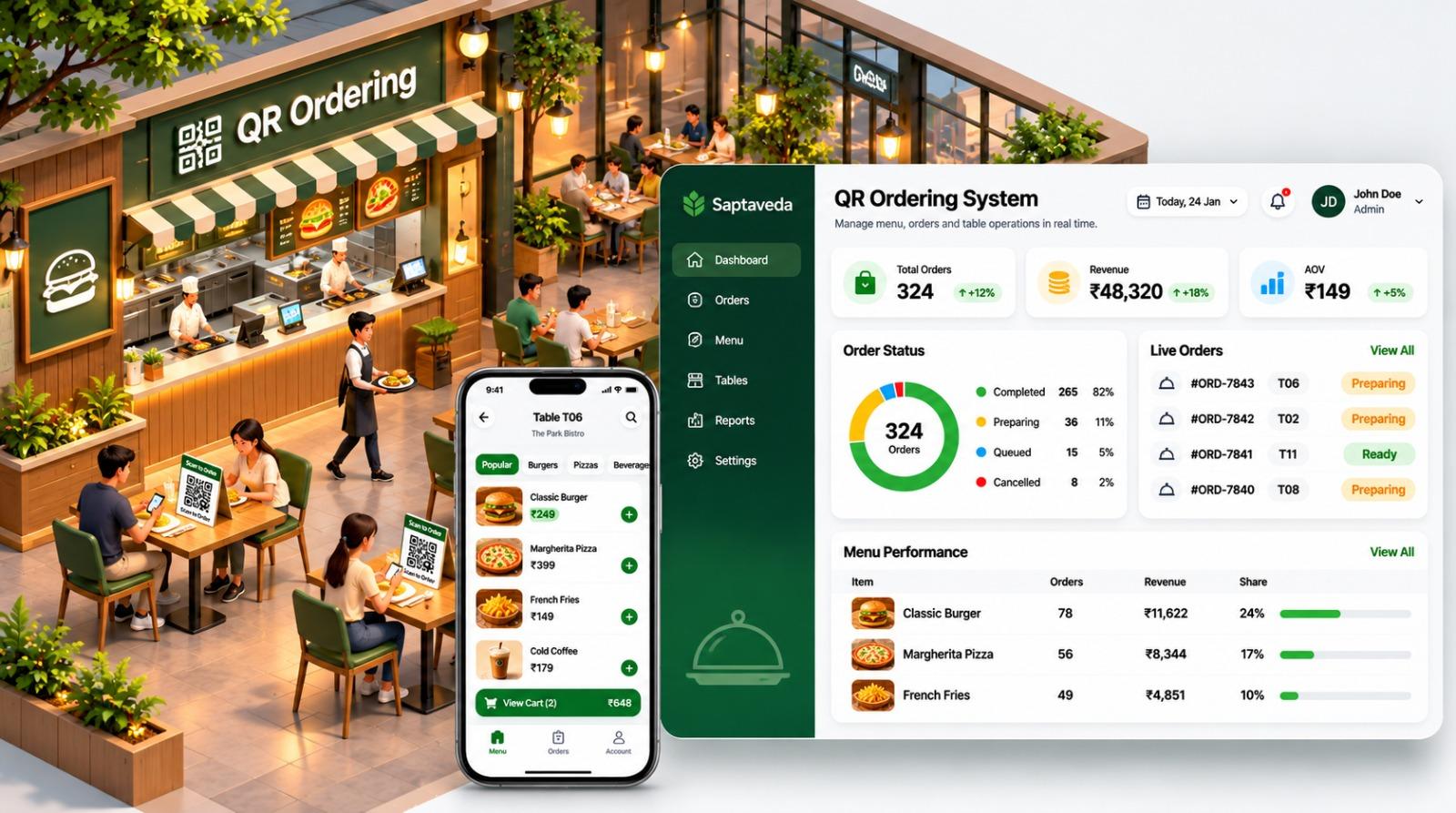
Guests scan the code on their table, browse the menu and order from their own phone.
Each table has its own QR code. Guests scan it, browse the menu by category, build a cart and place the order — no app to install and no wait for a server to take it. Orders arrive tagged with the table number, and the team tracks each one from received to preparing to ready.
Key features
- Table-specific QR codes; nothing for guests to install
- Menu by category, with photos and prices
- Cart and order placement from the guest's phone
- Live order list tagged by table and status
- Menu items and availability managed by the restaurant
- Order and menu performance reporting
How it works
- Step 1
Guest scans the table QR code
- Step 2
Menu browsed, order placed
- Step 3
Order arrives with the table number
- Step 4
Kitchen marks it preparing, then ready
Table Management System
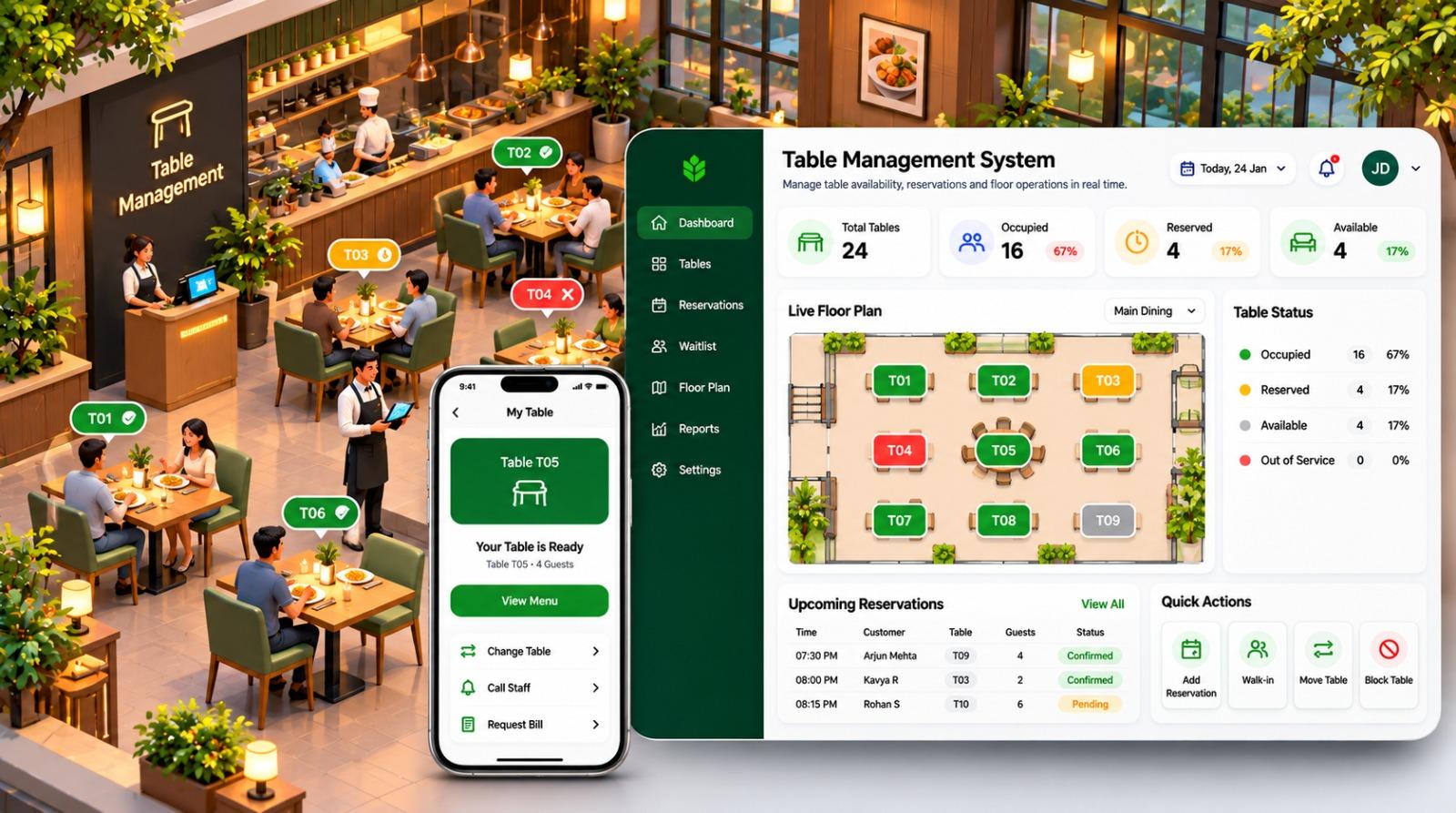
Table availability, reservations, walk-ins and the waiting list on one live floor plan.
One system for everything that happens between the door and the table. The host sees which tables are occupied, reserved, free or out of service; takes reservations; seats walk-ins; moves or blocks tables; and runs the queue from the same screen — and the guest is told when their table is ready.
Queue and waiting-list management are part of the system
Waiting lists, walk-ins and reservations share one floor plan, so the host can see who is next, which table fits the party and when it will be free. There is no separate queue product to buy or connect.
Key features
- Table allocation from a live floor plan
- Reservations with time, party size and status
- Walk-in seating, table moves and blocking
- Queue and waiting-list management
- Guest notification when the table is ready
- Guest requests from the table: call staff, request the bill
How it works
- Step 1
Guest reserves or joins the waiting list
- Step 2
Host allocates a table that fits the party
- Step 3
Guest notified the table is ready
- Step 4
Table turned for the next party
Operational benefits
What changes on the floor
Practical improvements for the team running service — not a new process to learn.
Staff spend time on service
Less time taking orders and juggling a paper waiting list, more time with guests.
Fewer order mistakes
Guests choose from the live menu themselves, and each order carries its table number.
A floor that turns smoothly
See which tables are free, reserved or about to be, and seat the next party sooner.
A fairer, calmer wait
Guests in the queue know where they stand and are told when their table is ready.
Running a venue rather than a restaurant? See our amusement park management software, or talk to us about custom software development for requirements beyond these two products.
Ready to modernise service?
Tell us about your restaurant — seating, service style and current systems — and we will show you how the two products would fit.
Or email us directly